

Dedicated Heap Allocator
A lot of the allocations that Gameface does are relatively small - 1KB or less. While general purpose allocators (such as TCMalloc, mimalloc or others) do a great job at managing allocations of all sizes, it makes sense to have a dedicated optimized allocator specifically for these “small” allocations.
Dedicated Heap Allocator (DHA) Overview
Section titled “Dedicated Heap Allocator (DHA) Overview”The DHA is designed to reduce memory fragmentation and handle small allocations very quickly. There’s the classic trade-off between memory and CPU time. The DHA generally offers better performance than the traditional general purpose allocators, but you must reserve a block of memory that will not be freed until the SDK shutdown. This means that you must gather some statistics for the memory usage in your UI and adjust the size of the block reserved for small allocations.
Internally the allocated memory for the DHA upon initialization (LibraryParamsWithExternalRenderingLibrary::DedicatedHeapAllocatorAllocatedBytes) is split up into chunks. Each chunk is then split into equally sized blocks that are distributed to the SDK.
Some key points of the DHA are:
- Needs a chunk of memory that is allocated throughout the lifetime of the SDK (basically it’s never freed)
- This memory is split up internally to blocks of up to
MaxBytesBlock - Allocations larger than
MaxBytesBlockare forwarded to the global user allocator
- This memory is split up internally to blocks of up to
- The allocated memory is used for all SDK objects (Views, Systems)
- The allocated memory is NOT all the memory that the SDK will request. It will be used for small allocations until all of it is depleted, then memory requests will be forwarded to the user allocator
- The DHA is thread-safe and memory can be distributed to any thread that the SDK uses
- The optimal amount of memory reserved for the DHA could be found by trial and error depending on the content displayed
- The amount of memory is usually directly correlated to the amount of DOM objects in all Views
Gameface comes with a pre-allocated pool of memory that is used for those small allocations and it can offer performance improvements of around 5-20% depending on the UI you’re displaying.
The pool is allocated once upon Library initialization and you can specify its size using the LibraryParamsWithExternalRenderingLibrary::DedicatedHeapAllocatorAllocatedBytes parameter. By default, the pool size is set to 2MB, which should be enough for a single UI page having ~500 DOM nodes.
Configuring the Dedicated Heap Allocator (DHA)
Section titled “Configuring the Dedicated Heap Allocator (DHA)”Optimal configuration of the DHA is highly dependent on the UI content. You can gather the current usage statistics using the Library::GetDedicatedHeapAllocatorStats API. The meaning of the DedicatedHeapAllocatorStats structure members are explained in the code, and the most important one you should be watching is DedicatedHeapAllocatorStats::ReservedBytes, DedicatedHeapAllocatorStats::BytesAvailableToAllThreads along with DedicatedHeapAllocatorStats::OverheadBytes, compared to DedicatedHeapAllocatorStats::TotalPoolBytes.
The optimization process goes something like this:
-
Set
LibraryParamsWithExternalRenderingLibrary::DedicatedHeapAllocatorAllocatedBytesto a large amount -
Run your UI scenes and take samples of the DHA usage using the
Library::GetDedicatedHeapAllocatorStatsAPI -
Check the
DedicatedHeapAllocatorStats::AssignedBytesfield- Note that this is simply the sum
DedicatedHeapAllocatorStats::ReservedBytes+DedicatedHeapAllocatorStats::OverheadBytes+DedicatedHeapAllocatorStats::BytesAvailableToAllThreads, but it’s added as a separate field for convenience - This is the peak amount of memory that the DHA reached during its lifetime
- Some of that memory could be “reserved”, and not actively used, but this is the theoretical peak
- Note that this is simply the sum
-
Take the reported amount of memory from the part where most of your game time would be spent, if possible
- For example, memory usage during initialization of a scene may be greater than the usage during “regular” runtime
-
Adjust
LibraryParamsWithExternalRenderingLibrary::DedicatedHeapAllocatorAllocatedBytesaccording to the desired sample point and take into account any UI memory budget that you might have
Performance comparison
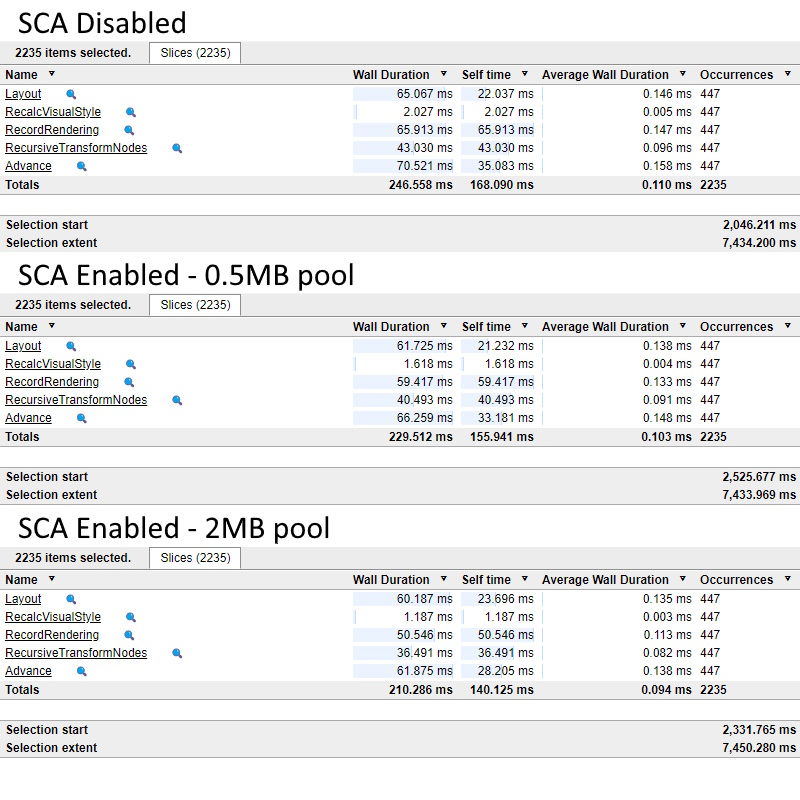
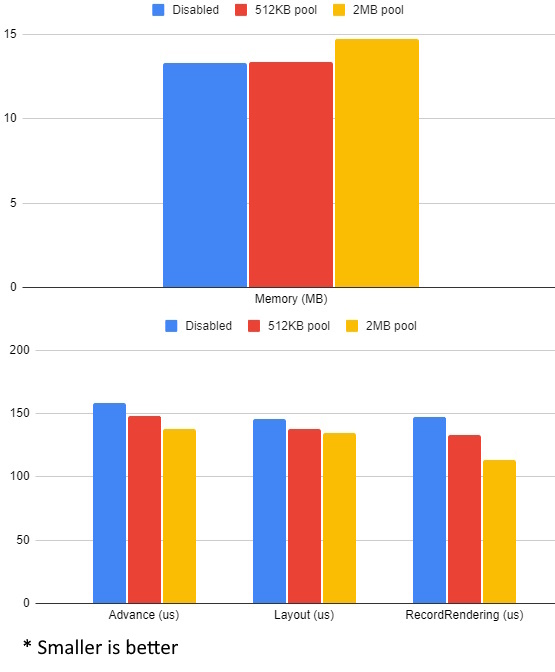
Section titled “Performance comparison”Here’s a performance comparison of a few seconds sample of the FPS-HUD SDK sample:
The tests are run under the following conditions:
- Several runs on a Windows machine using the same user allocator
- Samples are taken starting at around the 2-second mark so everything is initialized
- 3 sets of runs are done: DHA disabled, DHA enabled with 512KB pool and with 2MB pool
- The sample does around 1.6MB small allocations, hence the 512KB/2MB tests - one pool gets depleted, the other accommodates all allocations
- The memory used is tracked by the user allocator
© 2026 Coherent Labs. All rights reserved.