

SVG Support
SVG elements are supported in the following scenarios:
- Inline in the DOM
- As a
background-image - As the source of
<img>elements - As a border via
border-image-source
Support overview
Section titled “Support overview”The supported feature set is a subset of the SVG 2.0 specification. SVG elements can be styled and animated using standard CSS.
The most notable parts of the specification that are not supported are:
- Document structure
- No conditional processing
- No metadata
- No WAI-ARIA support
- Text
- Only basic
<text>support. No additional text-related properties or elements. <tspan>elements are ignored; their text is treated as part of the parent<text>.
- Only basic
- Embedded content
- No extensibility support (no
<foreignObject>).
- No extensibility support (no
- Painting
- No
vector-effects - No
<marker>elements - No
paint-order - No
color-interpolation - No rendering hints
- No
will-change
- No
- Paint servers
- No
patternsupport.
- No
- Scripting and interactivity
- Not supported.
- Linking
- No
<a>elements - No
<view>elements
- No
- Multimedia
- Not supported.
- Animation
- No SMIL animation. CSS/Web animations are supported.
Element-specific notes
Section titled “Element-specific notes”<solidcolor>is deprecated in SVG, but still supported.- SVG elements cannot use
mask: url(#...)andclip-path: url(#...)at the same time. If both are specified, clipping (clip-path) takes precedence.
SVG attributes vs. CSS properties with the same name
Section titled “SVG attributes vs. CSS properties with the same name”Several SVG attributes share names with CSS properties but have different parsing rules.
The primary difference is unit handling:
- In CSS, properties like
width,height, andfont-sizemust include units (px,em, etc.). - In SVG attributes, these values may be unitless.
transform and transform-origin also differ between their CSS and SVG variants.
This does not typically affect styling, but it becomes relevant when animating these “duplicated” properties in CSS keyframes. See the Animation section below.
Animation
Section titled “Animation”Standard CSS animations are supported for inline SVGs.
There are two important limitations to be aware of:
-
Several properties have the same names in CSS and SVG but follow different rules.
For example:
- CSS
widthmust include units - SVG
widthmay not include units
For consistency with the animation system, keyframe animations for such properties must include units even when the SVG attribute normally does not.
In the example below,
y(an SVG-only attribute) remains unitless, whilewidthrequirespx: - CSS
@keyframes moving-rect { 0% { y: 0; width: 85px; } 100% { y: 100; width: 125px; }}-
Interpolation between two paths containing elliptical arc commands (
A/a) is not guaranteed to work, even if the commands appear compatible. Elliptical arcs are internally converted to up to four quadratic Bezier curves, so two arcs that look similar may end up with different internal representations.Paths can only be interpolated if their internal command sequences match.
For example:
M 10,30 A 20,20 0,0,1 50,30M 10,30 A 40,20 0,0,1 50,30
cannot be interpolated with each other because one arc expands to two Bezier curves, while the other becomes a single curve.
When animating paths, avoid elliptical arcs when possible and use quadratic or cubic curves.
Performance optimizations
Section titled “Performance optimizations”SVGs are internally cached when any of the following conditions is true:
coh-use-aa-geometryis disabled (default: enabled)- The SVG content size does not exceed
1024x1024.
SVGs are re-tessellated and redrawn when:
- Their content rectangle changes (e.g., due to animation)
- A style change invalidates part of the SVG tree
Inline SVGs are never cached in GPU textures. They follow the standard DOM redraw rules: they are redrawn only when a region of their content becomes dirty.
Example:
<!DOCTYPE html><html>  <style>    .cached1 {      width: 300px;      height: 300px;      background-image: url("cohtml.svg");    }    .cached2 {      width: 2048px;      height: 2048px;      background-image: url("cohtml.svg"); /* 800x600 content size */    }    .cached3 {      width: 300px;      height: 300px;    }    .cached4 {      width: 300px;      height: 300px;      background-repeat: no-repeat;    }    .non-cached1 {      width: 300px;      height: 300px;      background-image: url("cohtml.svg");      background-repeat: no-repeat;    }    .non-cached2 {      width: 300px;      height: 300px;      background-image: url("cohtml-large.svg"); /* 2048x2048 content size */    }  </style>  <body>    <!-- Cached, since the content rectangle of `cohtml.svg` does not exceed 1024x1024. The element size is irrelevant. -->    <div class="cached1"></div>    <div class="cached2"></div>
    <!-- Inline images are also cached. The `background-repeat` property is ignored here. -->    <img class="cached3" src="cohtml.svg">    <img class="cached4" src="cohtml.svg">
    <!-- Not cached, since the `background-repeat` property is set to `no-repeat`. -->    <div class="non-cached1"></div>
    <!-- Not cached, since the content rectangle of `cohtml-large.svg` exceeds 1024x1024. The element size is irrelevant. -->    <div class="non-cached2"></div>  </body></html>
SVG Caching and Surface Reuse
Section titled “SVG Caching and Surface Reuse”Gameface optimizes performance by aggressively reusing cached SVG surfaces. By default, when an external SVG is rendered via background-image, mask-image, or the <img/> tag, Gameface attempts to reuse an existing cached surface. Reuse occurs when the difference between the previous rendering scale and the current scale falls within an acceptable tolerance. To further reduce rendering overhead without introducing visual differences, this cache tolerance is dynamically loosened while an element is actively animating.
Border Image Behavior
Section titled “Border Image Behavior”SVGs utilized as border images (via border-image-source) follow a distinct caching strategy. Gameface generates a single surface for each section of the generated 9-slice, which is then repeated on the GPU to handle the border-image-repeat property (including gaps created by the space value).
In that case instead of relying on global scale, the reuse tolerance is determined by the similarity of the gap size and SVG tile size compared to the cached version.
Controlling Caching Behavior
Section titled “Controlling Caching Behavior”Developers can opt out of heuristic reuse and enforce strict drawing, requiring an exact match between the previous and current compared values. This behavior is controlled on a per-resource basis using the shape-rendering property applied on the root <svg> element.
shape-rendering value | Caching behavior |
|---|---|
auto or optimizeSpeed | Aggressive Reuse: Allows approximate matching based on tolerances. |
crispEdges or geometricPrecision | Strict Reuse: Requires an exact match to reuse the surface. |
SVG border images
Section titled “SVG border images”The following notes describe how SVG border images are computed and rendered. This information is useful for diagnosing rendering behavior when using an SVG as a border image.
Sizing and Slicing
Section titled “Sizing and Slicing”The border area where the 9-sliced SVG is drawn is defined by the border-image-width property. This value takes precedence over border-width, even if it is larger.
Once the layout algorithm determines the element’s box, a border area is established based on the border-image-width and an SVG image size is computed.
- Pixel Snapping: Boxes at fractional coordinates are snapped to the nearest pixel. A box at position
{10.3, 10.3}with size{40.3, 40.3}is evaluated as having position{10, 10}and size{41, 41}. - Default Sizing: The image size is computed using the default sizing algorithm with no specified size, using the border image area as the default object size. This computed image size serves as the initial viewport to which the SVG maps its units.
The source SVG is then sliced according to the border-image-slice property.
- Numeric values are rounded to the nearest integer (e.g.,
20.3becomes20;30.9becomes31). - Percentage values are used with their fractional parts. For an image size of
90x90, a33%slice is evaluated as29.7.
Finally, the slices are drawn into the destination border pieces based on the border-image-repeat value, the rules of which are described here.
Example
Section titled “Example”The following example demonstrates the border image algorithm using concrete values.
Say that we want to draw an SVG with the following form.
<svg xmlns="http://www.w3.org/2000/svg" width="90" height="90" viewBox="0 0 90 90" preserveAspectRatio="none"> <!-- SVG content --></svg>And we want to draw it into an element with the following CSS rules acting on it.
.withBorderImage { position: absolute; top: 0px; left: 0px; width: 150px; height: 150px; border: 20.3px solid transparent; border-image-width: 30.3px; border-image-slice: 20.3; border-image-repeat: repeat; border-image-source: url(./border_image.svg);}Let’s assume that the layout algorithm defines a box at {0, 0} with a size of {150, 150}.
The fractional part of border-image-width (30.3) is discarded, yielding 30px. Based on the 150x150 box, the destination pieces are as follows.
- 4 Corners:
30x30each. - Top/Bottom Pieces:
90x30. - Left/Right Pieces:
30x90. - Center Piece:
90x90.
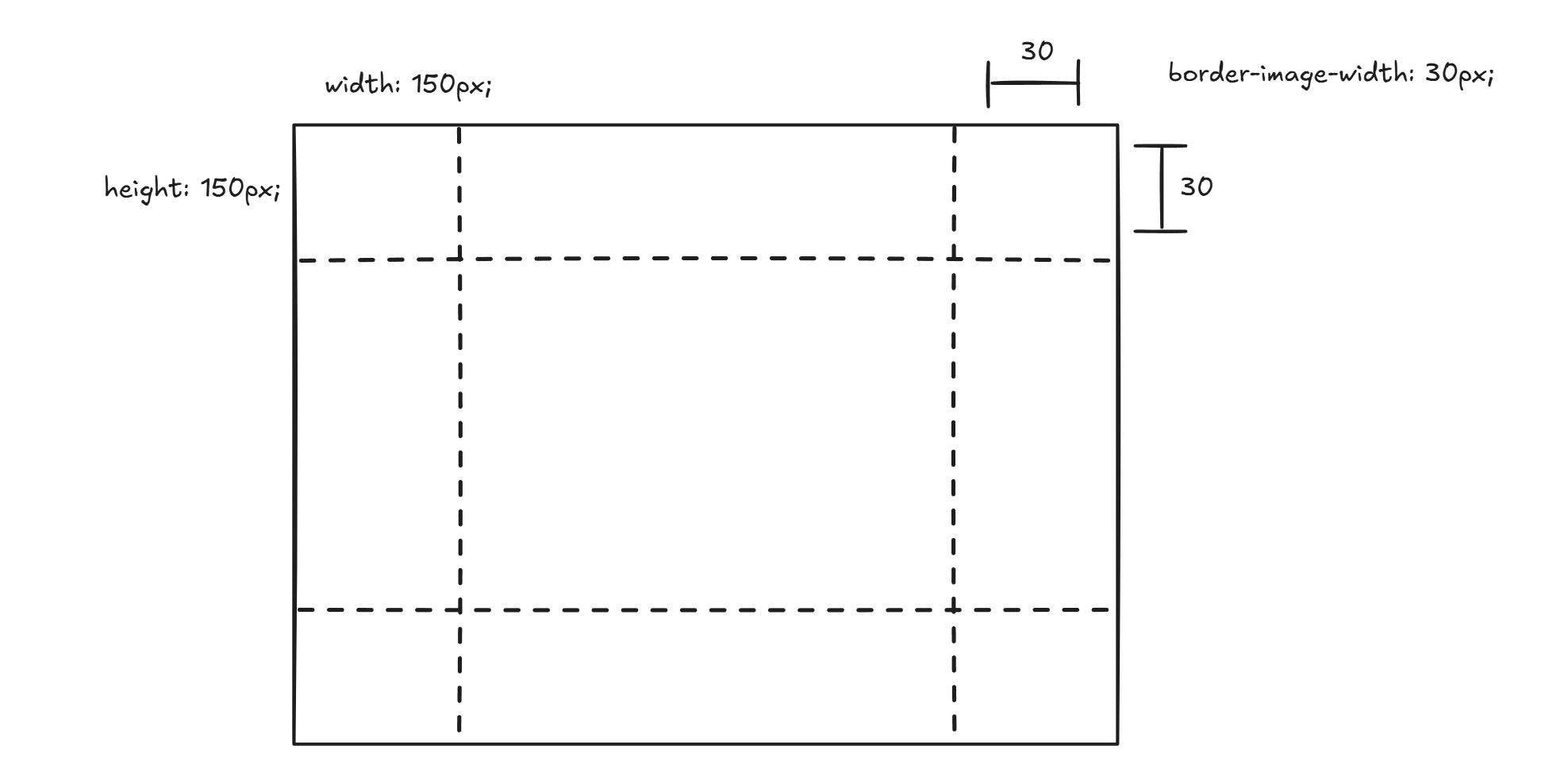
Since the SVG has intrinsic dimensions, the image size is evaluated as 90x90.
The numeric border-image-slice of 20.3 is rounded to 20 which results in the following slices.
- 4 Corners:
20x20each. - Top/Bottom Pieces:
50x20. - Left/Right Pieces:
20x50. - Center Piece:
50x50.
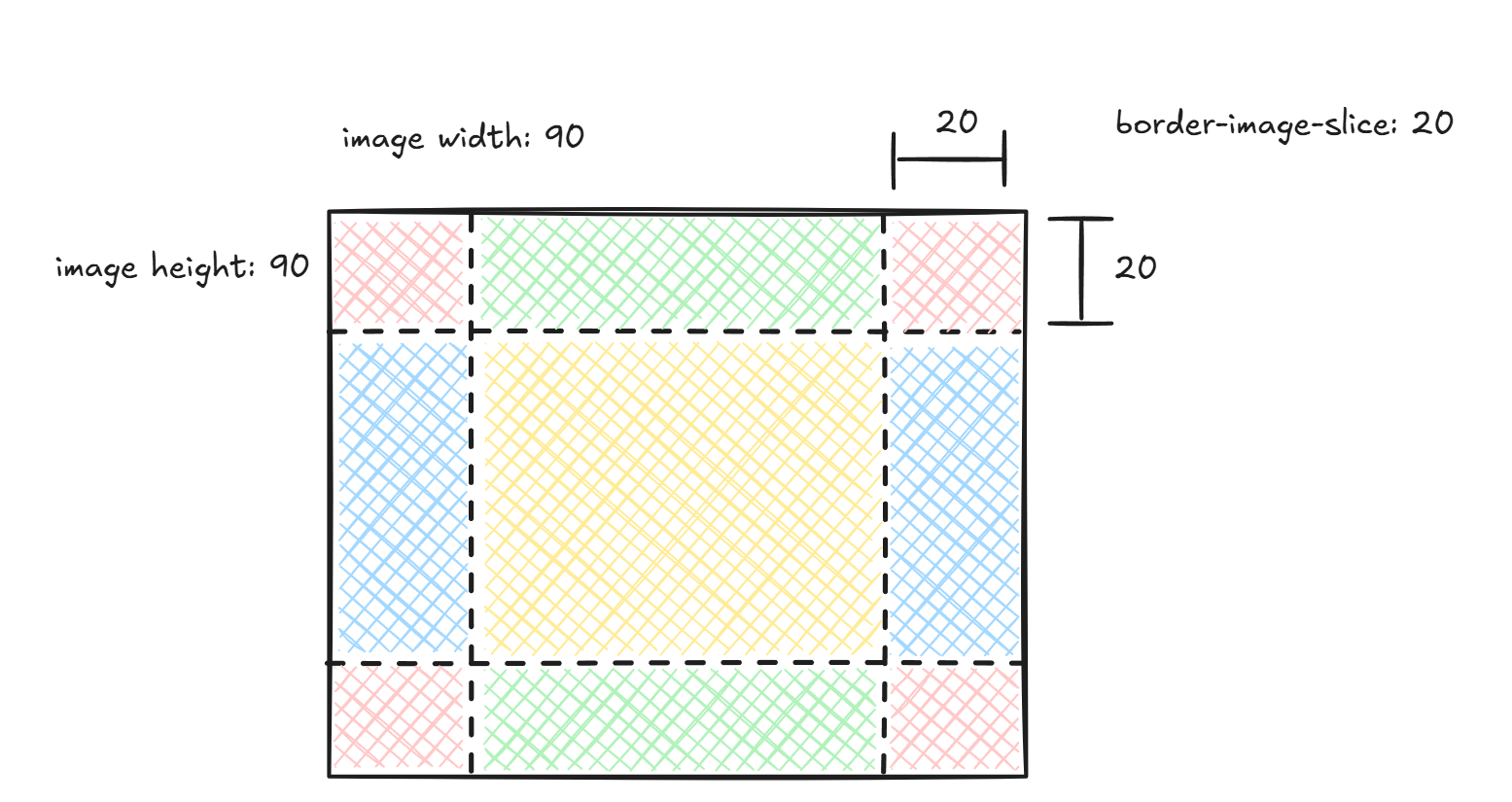
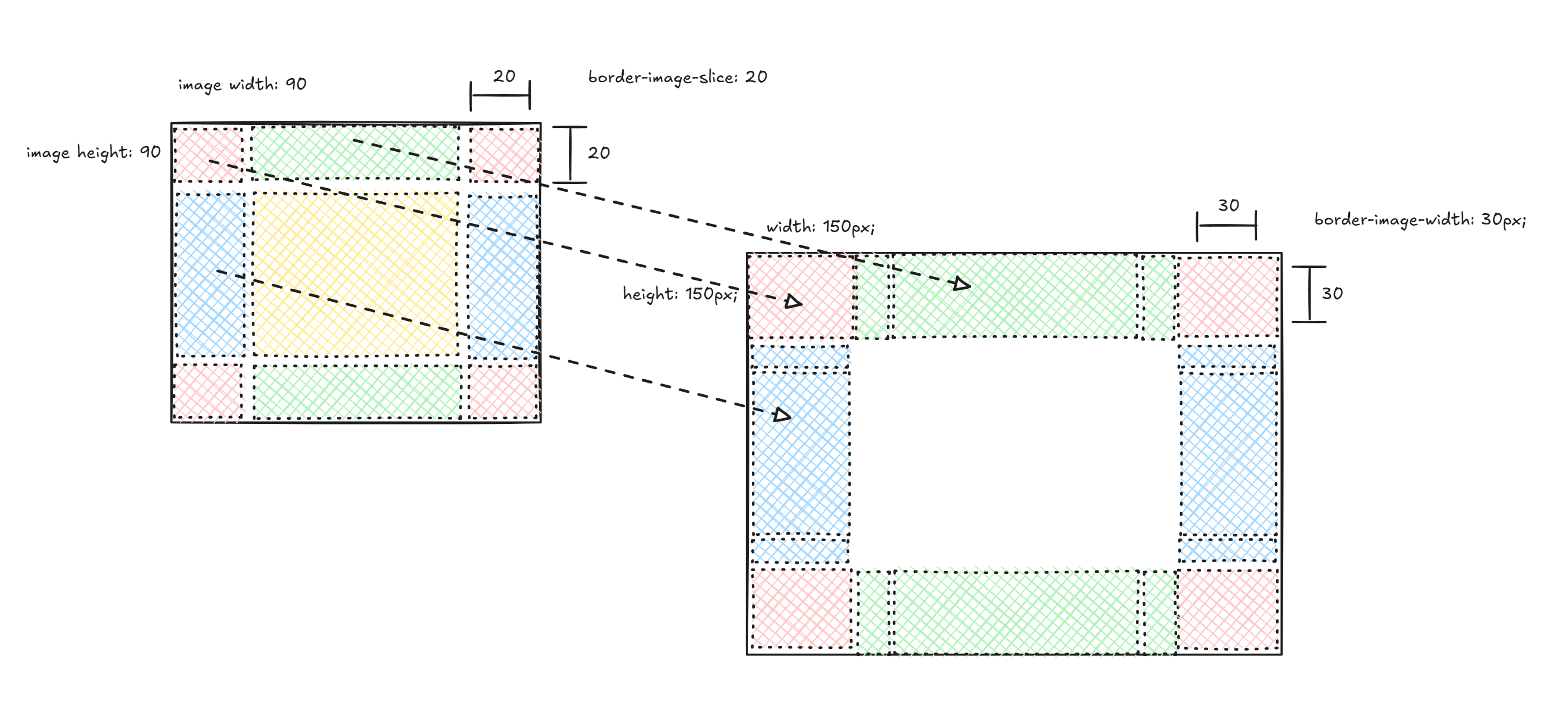
The slices are drawn into the destination pieces using the border-image-repeat rules:
- Corners: Scaled to fit the
30x30destination. - Top and Bottom: Since
border-image-repeatisrepeat, the slices are scaled to match the destination height -30px.- Scale Factor:
30 / 20 = 1.5. - The resulting
75x30slices (scaled from50x20) are centered and repeated to fill the90pxwidth.
- Scale Factor:
- Left and Right: Slices are scaled to match the destination width -
30px.- Scale Factor:
30 / 20 = 1.5. - The resulting
30x75slices (scaled from20x50) are centered and repeated to fill the90pxheight.
- Scale Factor:
- Center: Because the
fillkeyword is absent fromborder-image-slice, the center piece is not drawn.
Edge cases
Section titled “Edge cases”Relative Units in SVG Intrinsics and Media Queries
Section titled “Relative Units in SVG Intrinsics and Media Queries”While the SVG specification states that only absolute units should be used to compute intrinsic dimensions, modern browsers often allow font-relative units (like rem). This introduces complex edge cases, particularly when an SVG is used as a background image.
Consider the following SVG, where width depends on font-size, but font-size depends on the viewport width via a media query:
<svg width="10rem" height="10rem" font-size="10px" viewBox="0 0 50 50" preserveAspectRatio="none" xmlns="http://www.w3.org/2000/svg"> <style> @media (min-width: 100px) and (max-width: 100px) { svg { font-size: 50px; } } </style> <rect x="0" y="0" width="1rem" height="1rem" fill="rgba(0, 255, 0, 0.5)"/> <rect x="0" y="0" width="50" height="50" fill="rgba(0, 0, 255, 0.5)" /></svg>To render this, Gameface performs the following steps:
- Parse: Load the SVG and construct the DOM nodes.
- Initial Style Resolution: Resolve styles for the nodes, ignoring viewport-dependent media queries (since the viewport size is not yet known).
- Intrinsic Calculation: Compute the SVG’s intrinsic dimensions based on these initial styles.
- Box Determination: Calculate the final draw box on the page using the intrinsics and the page CSS.
- Contextual Resolution: Apply the calculated draw box as the viewport context. This activates or deactivates viewport-based media queries.
- Final Layout: Re-calculate layout for the SVG content based on the new context.
- Draw: Render the content.
In the example above, activating the media query changes the font-size, which changes the intrinsics (Step 3). If the engine were to re-evaluate the intrinsics based on this new state (e.g. --redraw-all), the draw box would change, disabling the media query, and creating an infinite layout loop.
Currently, Gameface does not automatically break this infinite loop. We rely on users to avoid constructing circular dependencies between intrinsic sizing and media queries.
Pointer events on elements with stroke-dashoffset
Section titled “Pointer events on elements with stroke-dashoffset”The stroke-dashoffset property creates gaps within the stroke of a rendered SVG element. According to the SVG specification, these gaps should be transparent to hit-testing - meaning mouse events or elementFromPoint calls targeting a gap should pass through and not register on the element.
Currently, Gameface does not support this behavior. Gaps created by stroke-dashoffset will still respond to hit-testing, so clicking a gap or calling elementFromPoint over it will return the element.
© 2026 Coherent Labs. All rights reserved.