Release notes
What’s new
Content Development
GUI for the Player application
The initial user interface for the Player application has been rolled out. Currently, it consists of a detachable console and a toolbar with navigation controls, an address bar, and bookmarks.
You can control whether the GUI is enabled with the --enable-gui command-line option.
Player support for the file:/// protocol
The Player application now supports the file:/// protocol. Furthermore, when loading UI inside the Player via Drag&Drop, the file:/// protocol will be used to load content.
Drag&Drop, the Player was internally setting the coui-root to the root of the drive and using the coui:// protocol to handle the resolving of absolute URLs inside the UI, but that was not working well in all cases. The Player application no longer changes the coui-root on Drag&Drop and the usage of relative URLs (such as ./folder/resource.ext or folder/resource.ext) should be preferred over absolute URLs (like /folder/resource.ext).If your UI currently relies on the above changed behavior to work, you can check this documentation section.
Core
Compatibility settings
We have introduced Compatibility settings to provide a cleaner, type-safe way to fall back to legacy behaviors during engine upgrades, entirely replacing the deprecated string-based Developer Options.
For a complete overview of how they work, please refer to the Compatibility settings documentation.
If your application currently passes string flags to DeveloperOptions, please see the Migration guide for instructions on updating your integration.
CSS sharing
Views and shadow trees now share CSS. Other than saving memory, this means that when using a component with some CSS it will be requested and parsed only if there is no one already using the given stylesheet. Note that there are limitations - if a stylesheet is modified by JS it can no longer be shared, and more importantly only stylesheets that take the same position are shared for performance reasons. This means if you have multiple components that have some shared style, it should come first to allow for better sharing between different components.
Faster complex selectors
A multitude of performance issues related to complex selectors and structural pseudo classes have been eliminated. The benefits of this are greatly dependent on the particular use case. Here is a list of the most notable changes:
- Complex selectors now check for maximum depth, making child and sibling selectors significantly cheaper.
- Sibling selectors can no longer cause rematch on changes that are not participating in any siblings selectors.
- Changing classes that participate in a selector that is to the left of a sibling combinator no longer causes full rematching of their subtrees.
- Structural selectors now only have a performance impact when modifying the DOM structure.
- We invalidate less elements when changing a class or id that is used in multiple complex selectors.
- We invalidate less elements when modifying the DOM structure.
Inspector profiling memory counters
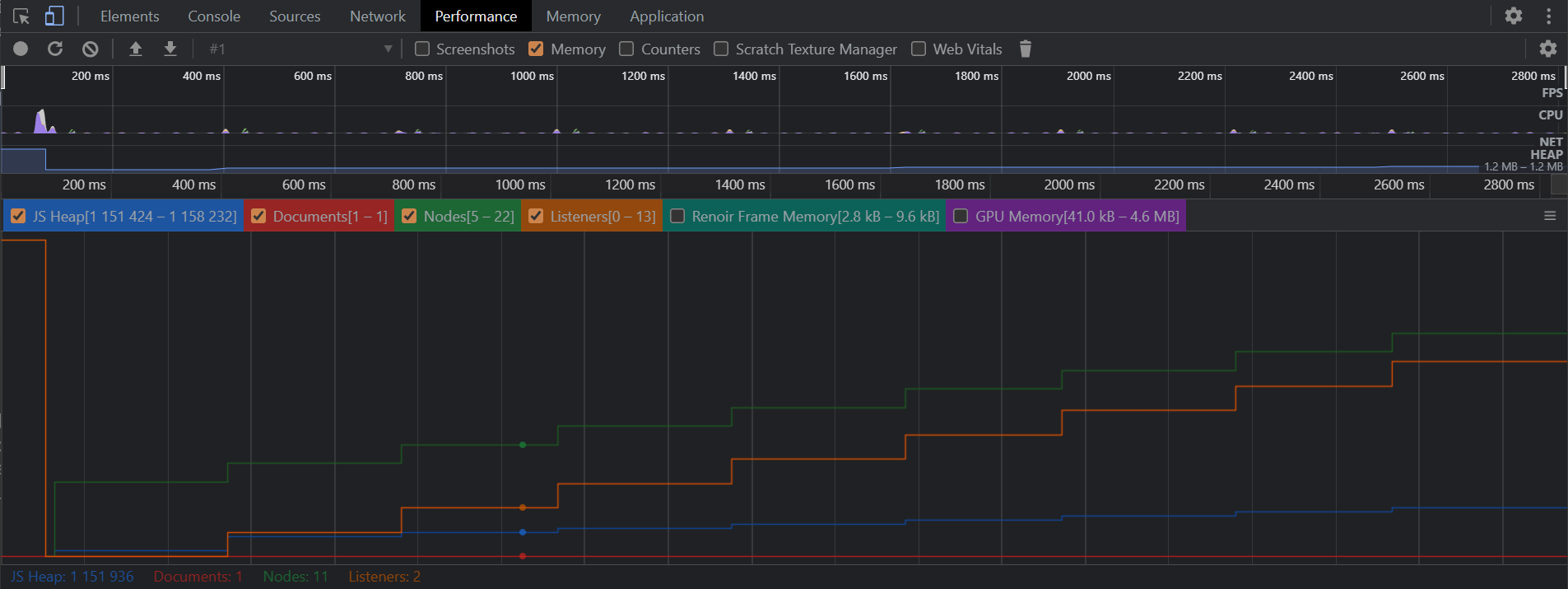
With this version, Prysm brings support for memory counters during profiling. Memory counters visibility is toggled through the Memory, Counters and Scratch Texture Manager checkboxes in the Performance tab.
Logging categories and filtering
With this release, Prysm logs include structured metadata (Severity, TargetUser, MessageType) and can be filtered by category during library initialization.
Categorized logs
Each log now carries a unique target audience (Internal, Content, Integration) and a unique message category (General, Internal, Rendering, PerformanceHint, UsageHint, Compatibility, Deprecation, ScriptOutput, and Binding). This helps route diagnostics to the right team and gives finer control over log noise.
New Logging API
cohtml::Logging::ILogHandler now uses WriteLog(LogInfo, const char*, size_t).
WriteLog(Severity, ...)has been removed.- Handlers must implement
WriteLog(LogInfo, ...)to receive full log metadata.
Filtering with LibraryParams::LoggingFilters
The Logging::Severity LoggingSeverity parameter of the Library has been removed. Use LibraryParams::LoggingFilters to filter by Severity and TargetUser / MessageType flag combinations:
cohtml::LibraryParams params;
params.LoggingFilters = cohtml::Logging::LoggingSettings(
    cohtml::Logging::TargetUser::Content | cohtml::Logging::TargetUser::Integration,
    cohtml::Logging::MessageType::General | cohtml::Logging::MessageType::Binding,
    cohtml::Logging::Warning);
Once LoggingFilters is set, Prysm emits logs only for the categories you selected, and filters out all others. For a log to be emitted, its target audience and message type must both be enabled, and its severity must be at or above the configured threshold. If any of these conditions is not met, the log is suppressed.
Migration notes
For migration steps, please see the Migration guide.
Related API reference
Proportional widths for East Asian text
Prysm now includes partial support for the font-variant-east-asian CSS property.
You can use font-variant-east-asian: proportional-width to enable proportional glyph spacing (when supported by the selected font). This replaces traditional full-width spacing with more compact, natural character widths, resulting in a denser and more visually balanced text layout.
proportional-width and normal values are supported.Cohtml fallback page
Calling View::LoadURL() without a resource handler set on the System will now load a default fallback page instead of failing. This lets you focus on other parts of the integration before setting up resource handling.
The MinimalHelloCohtml sample uses this fallback page to demonstrate integrating Cohtml as quickly as possible.
url to View::LoadURL() will fail to load the fallback page, regardless of whether a resource handler is set.SVG rendering overhaul and caching optimizations
Enhanced browser compliance for SVGs
We have overhauled how SVGs used as backgrounds and masks are mathematically calculated and drawn. Our rendering logic for SVG dimensions, background-size, and background-position has been explicitly aligned to match modern browser behavior. This ensures that properties like background-repeat: round and mask-repeat: round behave exactly as expected, without clipping or improperly resizing content. Importantly, this strict standard compliance does not come at the cost of visual artifacts. Repeating SVGs now tile perfectly without introducing unwanted gaps or seams.
Massive SVG cache utilization boost
By optimizing how Prysm detects when an SVG needs to be redrawn (such as during dynamic scaling or layout changes), and by enabling tolerances for surface caching for repeating backgrounds, we have significantly increased how often Prysm can reuse existing rendering work. In our internal layout tests, SVG cache utilization jumped from ~37.5% to ~53% without any loss in visual quality.
Precise control over SVG edge sharpness
When rendering repeating SVGs with fractional CSS sizes (like 33.333px), Prysm must map these mathematical dimensions to the physical pixel grid of the screen. By default, Prysm uses smooth interpolation to blend these sub-pixel differences, which is usually ideal but can occasionally make edges look soft or blurry. Users can now override this behavior using the image-rendering CSS property. By applying image-rendering: crispEdges or image-rendering: pixelated to the element drawing the SVG, Prysm will use point sampling. This preserves a sharp, crisp look and prevents smoothing artifacts when the SVG’s layout resolution doesn’t perfectly align with the physical screen grid.
Rendering
Font rendering improvements
With this version, Prysm introduces a series of improvements to how text is rendered, enhancing both the SDF on GPU glyph rendering and the raster glyph handling, resulting in clearer glyph details and smoother animations.
Improved GPU SDF generation
Previously, GPU-rendered SDF glyphs were always generated at a fixed size of 52 px with a default spread of 9 px. This version replaces that single configuration with a more adaptive system:
Three SDF generation sizes
GPU SDF glyphs are now generated at one of three SDF sizes:
- Small — 32 px
- Medium — 52 px
- Large — 72 px
The renderer automatically picks the closest bigger SDF generation size to the requested text size, ensuring better quality without unnecessary memory usage. Each SDF size also has its own respective spread value, calculated as 10% of the SDF size (rounded up).
Large glyphs now rendered as paths
In addition to this release, very large glyphs - those exceeding 256 px - are now rendered using our path tessellation algorithms. Because our SDF generation is optimized for the quality of small to medium-sized text, the larger text size we request for an SDF glyph, the more it would lose its detail and shape. By switching to path rendering at these larger sizes, glyphs can retain their full outline precision, resulting in sharper edges, smoother curves, and significantly improved visual quality for oversized text. This ensures large titles remain crisp and detailed without relying on oversized SDF glyphs. Note that path-based glyphs are currently not cached, they will get regenerated each time the text has to be rendered.
This behavior can be turned off with the text-rendering CSS property. Any text in DOM elements with text-rendering: optimizeSpeed will be rendered without path tessellation even if exceeding text size of 256 px;
Bigger stroke widths for SDF glyphs
Another improvement in this release is how large text stroke widths are handled. By design, stroke widths are constrained by a glyph’s spread value. Before, if the requested stroke exceeded the allowed limit, the stroke width was simply capped. Now, the way we calculate that limit has been reworked and Prysm can also dynamically increase the glyph’s spread (up to a defined maximum) when a larger stroke is needed.
This means:
- Prysm now supports larger strokes than before
- Strokes are no longer arbitrarily capped at lower values than needed
- A new glyph will be regenerated with a larger spread if the requested stroke width exceeds the allowed maximum for its base SDF size and spread combination.
The maximum spread is chosen such that strokes can scale up to ~40% of the SDF resolution. This allows significantly thicker strokes while preventing overly bloated glyphs.
Before and after of the max stroke generated for the same text at 64 px:

Float-precision text sizes
Text sizes are no longer restricted to integer sizes, resulting in:
- Much smoother animations (e.g. in scale transitions)
A before and after of an example text scale animation: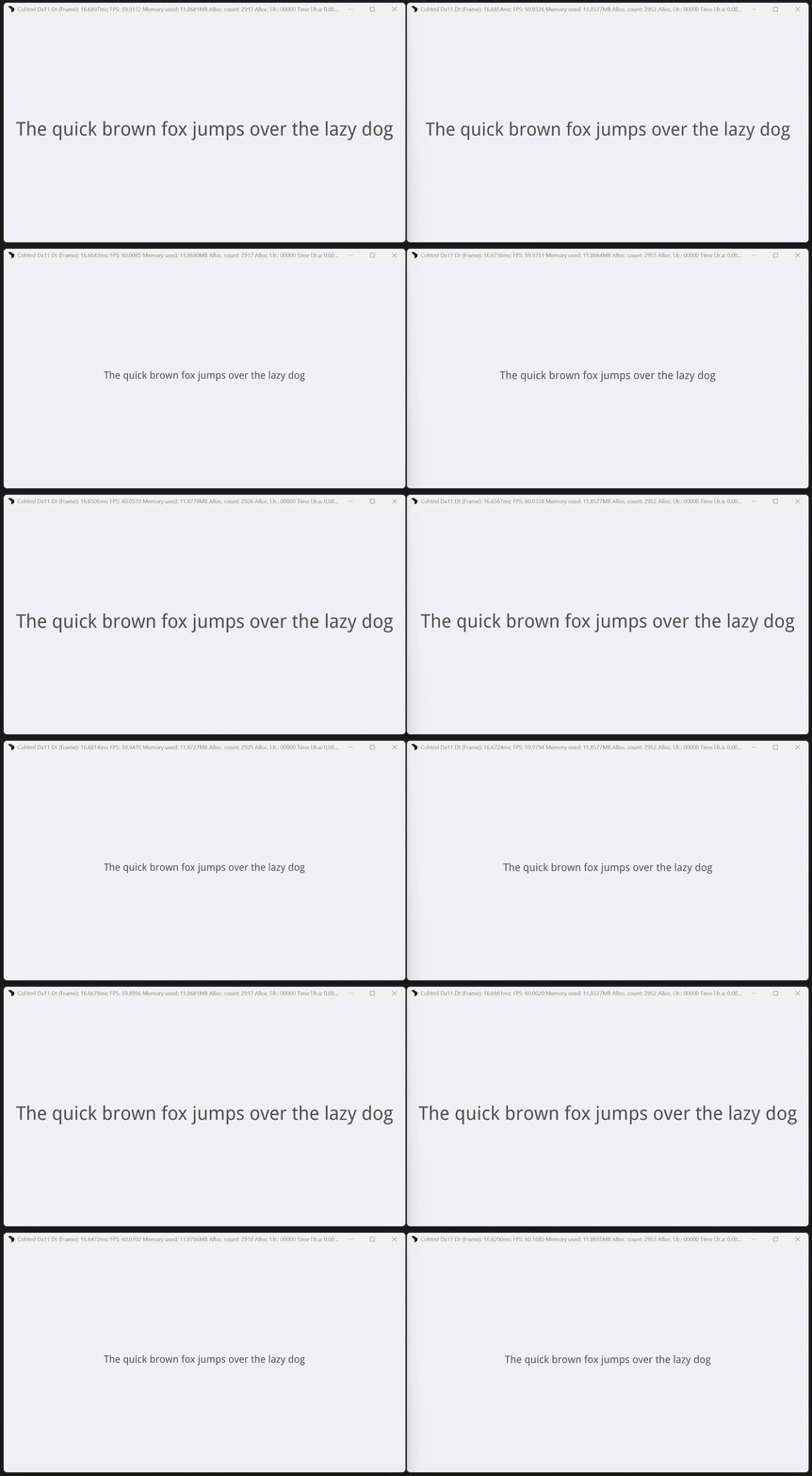
- More accurate rendering of user fonts that define fractional pixel sizes
Before and after of a bitmap font containing glyphs that are originally 46.5 px:

Smarter raster glyph reuse
Raster glyphs now reuse existing glyphs more effectively. Previously, any fractional size difference forced the system to generate a completely new raster glyph. This was both memory-inefficient and unnecessary. Now, raster glyphs are reused when their sizes are close enough, specifically when rounding them to the nearest integer results in the same value. This reduces the number of raster glyphs that will be generated and cached, improving performance and memory usage.
An example of the font atlases generated for the same raster text with all glyphs between 24 and 32 px spaced out by a 0.1f size difference: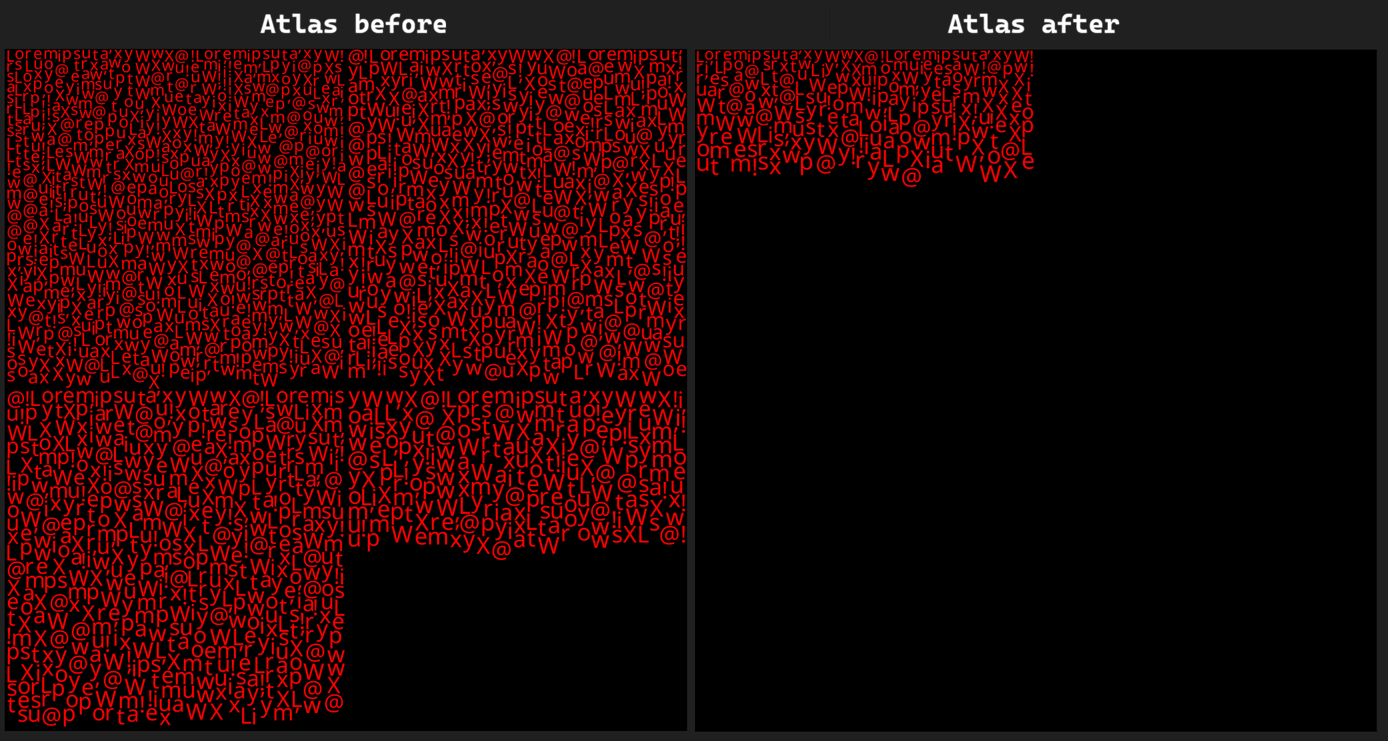
Unreal Engine
New Unreal Blueprint Custom Event handling with multiple parameters
- Renamed the old
Register for EventBlueprint node toRegister for Prysm UI Event. - Introduced a new
Register for Prysm UI Event(RegisterForCustomEventin C++, but sharing the same name in Blueprint asRegisterForEvent) node API and deprecated the old one.- The old API was accepting a
Custom Eventnode with zero parameters only (due to an Unreal Engine limitation). - The new API accepts a string (the name of the node itself) and reference to the
Custom Eventnode owner object (in most cases this will be the Blueprint object where the node was created)- This allows for
Custom Eventnodes with multiple parameters, so long as they are primitive or Unreal string types (current limitation). - UI data can now be passed from the UI code to Blueprint.
- This allows for
- The old API was accepting a
For more info, please visit our Unreal Engine documentation.
ScriptingReady delegate now firing after the Ready event
The UE integration for Prysm HUD and Widget have a ScriptingReady delegate. This delegate is now listening for the View’s Ready event.
ScriptingReady will be fired when the View’s document is fully loaded and the “ready for bindings” event has completed.
ScriptingReady delegate had to be manually triggered by the UI after the ViewReady event.Difference between ReadyForBindings and ScriptingReady delegates and when to use them
The ReadyForBindings and ScriptingReady delegates differ in the time they will be fired, which makes them useful in different scenarios.
The
ReadyForBindingsevent is fired as soon as you can attach listeners on the C++ side. It does not mean that your UI code is loaded or processed, just that Prysm will respect any binding setup code you call - useful when you want to start listening for events, or bind your UI models.The
ScriptingReadyevent is fired when your UI code is loaded and processed (during the load DOM event, unless cohtml.js is loaded deferred). This makes it useful as a place to start triggering events from the C++ side - for example, ones that may have listeners set during load.
Migration guide
Data binding
Removal of different binding modes for 64-bit integers
The ViewSettings::int64BindingMode option has been removed in this release. 64-bit integers are now always bound as JavaScript BigInt.
If your JavaScript previously relied on Number semantics, you may need explicit conversions:
Number(myBigIntValue)
This is especially important when interacting with APIs that expect Number instead of BigInt.
No changes are required on the C++ side unless your integration depended on the deprecated behavior, where values were bound as Number when they fit within Number.MAX_SAFE_INTEGER, and as BigInt otherwise.
Array binding changes
Data binding now supports a wider range of array types, including:
- arrays of strings
- polymorphic arrays
- multidimensional arrays
- arrays containing other containers
Support for these arrays requires setting the BindElement field in the ArrayInfo struct.
Required changes
If you have:
- custom
Propertyimplementations, or - overrides of
GetArrayValue<>::Invoke
you must populate the BindElement field in the returned ArrayInfo. The callback is the same one passed to TryBindArrayByRef and can be reused directly.
Performance considerations
Arrays of boolean values, numbers, and user-defined types are directly evaluated without going through creating JavaScript values.
Arrays types that require using the BindElement callback have some overhead due to converting the elements to JavaScript values.
If this becomes a concern, you can continue using the previous workaround of wrapping nested containers in a user-defined type. For example, instead of std::vector<std::vector<Foo>> use std::vector<Wrapper>, where Wrapper contains std::vector<Foo>.
Switching to the new Blueprint node for registering for UI events
There are now two Register for Prysm UI Event Blueprint nodes:
- The old one that has been deprecated requires
- A string with the name of the UI event
- A
Custom Eventnode, explicitly with 0 parameters
- The new node requires
- A string with the name of the UI event
- A
UObjectwhere yourCustom Eventnode resides (usually it will be areference to self) - A string with the name of the
Custom Eventnode itself
The old Register for Prysm UI Event node should be replaced, as it will be removed in future versions.
For more info, please visit our Unreal Engine documentation.
Pixel Shader Changes
As a result of the removal of the old AA clipping feature, we have also removed the CohClipMaskPS.hlsl and CohClipMasking.ihlsl shader files. Also, the PST_ClippingRect, PST_ClippingCircle, PST_ClippingTexture and PST_ClippingPath, pixel shader types have been deprecated, as well as the ST_ClipMask, ST_ClippingRect, ST_ClippingCircle, ST_ClippingTexture and ST_ClippingPath shader types.
Changes to the Data_PS constant buffer data layout
With the new release, our Pixel Shader (PS) Constant Buffer (CB) Data_PS has had its data layout slightly altered to reflect the changes related to the old AA Clipping feature removal. All custom shaders accessing elements from the CB will have to be modified to use the correct elements.
| Previous Layout | Current Layout |
|---|---|
|
|
Example constant buffer data extraction:
	int vs, ps, shaderType;
	decode(input.VaryingData, vs, ps, shaderType);
	// ps will point to a float4 that contains the shared CB offset and some per command user data
	// ps + 1 will point to the color that should be used for this pixel
	float4 perCommandData = Data_PS[ps];
	float4 inColor = Data_PS[++ps];
	// perCommandData.x is the index of data used by several batched commands. The format
	// of this shared data is custom for every command type.
	int sharedCBOffset = int(perCommandData.x);
	int commonPSCBDataOffset = max(0, sharedCBOffset + SHARED_PS_DATA_OFFSET);
	int additionalFlags = int(Data_PS[commonPSCBDataOffset].x);
	int colorMatrixOffset = int(Data_PS[commonPSCBDataOffset].y);
Below is a table, mapping the Pixel Shader CB elements' previous and new location inside the Data_PS CB along with their usage:
| Before | Now | Usage |
|---|---|---|
Data_PS[sharedCBOffset + SHARED_PS_DATA_OFFSET].y | Data_PS[sharedCBOffset + SHARED_PS_DATA_OFFSET].x | additionalFlags |
Data_PS[sharedCBOffset + SHARED_PS_DATA_OFFSET].z | Data_PS[sharedCBOffset + SHARED_PS_DATA_OFFSET].y | Color matrix offset (-1 if none or not needed) |
Data_PS[sharedCBOffset + SHARED_PS_DATA_OFFSET].z | Padding (unused for now) | |
Data_PS[sharedCBOffset + SHARED_PS_DATA_OFFSET].w | Padding (unused for now) |
The whole AA clipping logic has been removed from the shaders. This means that the AA Clipping data has been removed from the constant buffer data along with its offset in the constant buffer represented by SHARED_PS_AA_CLIPPING_DATA_OFFSET.
Cohtml multithreading integration changes
Executing Layout work
The LibraryParams::UseDedicatedLayoutThread and ViewSetttings::ExecuteLayoutOnDedicatedThread options have been removed. Cohtml now always works as if both options were true, meaning Layout tasks are always scheduled for execution by calling the Library::ExecuteWork() method as opposed to being executed on the UI thread directly inside the View::Advance() method.
Library::ExecuteWork() in order to execute any Layout, as Cohtml will never automatically do so. If Library::ExecuteWork() is not called and no Layout work is executed, Cohtml will inevitably deadlock. This is especially relevant if you want to execute Layout on the UI thread, as explained in this section.To continue to execute Layout on the UI thread, you should call Library::ExecuteWork() once per frame after every View::Advance() call like so:
// Execute Layout for the specific view, then return.
Library::ExecuteWork(cohtml::WorkType::WT_Layout, cohtml::WorkExecutionMode::WEM_UntilQueueEmpty, view->GetTaskFamilyId());
Library::ExecuteWork() call as opposed to inside the View::Advance() method.View::Advance() and Library::ExecuteWork(), as the APIs may need to wait for style solving or Layout to finish first and the UI thread can deadlock as a result.Developer options migrated to Compatibility settings
Overview
In this release, we introduce Compatibility settings to provide a cleaner, safer way to fall back to legacy behaviors during Prysm upgrades.
Consequently, passing legacy fallback behaviors via string flags to cohtml::ViewSettings::DeveloperOptions and cohtml::LibraryParams::DeveloperOptions is deprecated. These fallbacks are now exposed as typed enum flags through ViewSettings::CompatibilitySettings and LibrarySettings::CompatibilitySettings.
For a complete overview of this new feature, refer to the documentation.
Migration Steps
Determine if migration is necessary
If your application does not currently pass any legacy behavior strings to the DeveloperOptions of your View or Library settings, you are done - no migration is required.
If you are using developer options, proceed to the following steps.
Remove the deprecated resource request option
The --force-resource-requests-on-the-dom-thread developer option has been entirely removed and has no compatibility flag equivalent. If your code uses this option, you must remove it.
Migrate View developer options
Instead of passing string values to cohtml::ViewSettings::DeveloperOptions, apply the corresponding bitwise flags to cohtml::ViewSettings::CompatibilitySettings.
// Old approach
std::string viewDevOptions;
viewDevOptions += "--synchronous-style-solving ";
viewSettings.DeveloperOptions = viewDevOptions.c_str();
// New approach
viewSettings.CompatibilitySettings |= cohtml::CompatibilityFlags::VCF_SynchronousStyleSolving;
View Settings Mapping Table:
Deprecated Developer Option (cohtml::ViewSettings) | New Compatibility Flag (cohtml::CompatibilityFlags) |
|---|---|
--disable-aspect-ratio | VCF_DisableAspectRatio |
--synchronous-style-solving | VCF_SynchronousStyleSolving |
--disable-flex-basis-units | VCF_DisableFlexBasisUnits |
--include-style-value-in-mutation-observer | VCF_IncludeStyleValueInMutationObserver |
--strip-whitespaces | VCF_StripWhitespaceNodes |
--revert-rematching | VCF_RevertRematchingBehavior_Partial |
--revert-rematching-expensive | VCF_RevertRematchingBehavior_All |
Migrate Library developer options
Similarly, instead of passing string values to cohtml::LibraryParams::DeveloperOptions, apply the corresponding bitwise flags to cohtml::LibrarySettings::CompatibilitySettings.
// Old approach
std::string libraryDevOptions;
libraryDevOptions += "--disable-font-data-preloading ";
libraryParams.DeveloperOptions = libraryDevOptions.c_str();
// New approach
librarySettings.CompatibilitySettings |= cohtml::CompatibilityFlags::LCF_DisableFontDataPreloading;
Library Settings Mapping Table:
Deprecated Developer Option (cohtml::LibraryParams) | New Compatibility Flag (cohtml::CompatibilityFlags) |
|---|---|
--dont-snap-to-integer-coords-before-transform | LCF_DoNotSnapToIntegerCoordsBeforeTransform |
--disable-font-data-preloading | LCF_DisableFontDataPreloading |
Font loading changes
Deprecated font APIs removal
The cohtml::System::AddFontsFromFolder_DEPRECATED and cohtml::System::SetDefaultFallbackFontName_DEPRECATED APIs have been removed. These are legacy APIs pre-dating dynamic font loading. In case you still use them, keep reading on how to transition to dynamic fonts.
How to load fonts dynamically
cohtml::System::AddFontsFromFolder_DEPRECATED used to pre-load fonts in the System with default font descriptions, which can later be used in loaded pages. Dynamic fonts have several benefits, some of which are automatic unloading, custom font descriptions, overriding existing fonts, and more. To load fonts dynamically, simply add @font-face rules to your CSS styles. If you wish to pre-load the fonts ahead of time as the old API did, use the System::RegisterFont() API with matching font description of the font you wish to load.
For more information on pre-loading, see here.
If you are not sure which fonts are not being loaded after migrating, you can do the following:
- grep for
font:shorthand andfont-family:longhand - Prysm issues warnings about missing fonts during uninitialization if you used a
font-familywithout providing a font resource for it, check the logs for those warnings.
Then, make sure to add the corresponding @font-face rules that match those font names to your CSS styles.
How to change the default fallback font
Prysm will fallback to the embedded last resort font when no explicit fonts are specified. The fallback font’s purpose is to help identify font loading and usage issues during development, see here. If the embedded font doesn’t meet you needs, you can add additional fonts as fallbacks. For more information see here. To achieve predictable behavior, avoid using fallback fonts for production and instead explicitly specify fonts with font or font-family declarations in your CSS styles.
Font Pre-loading Simplification
The cohtml::IAsyncResourceStreamResponse and cohtml::IAsyncResourceHandler::OnResourceStreamRequest APIs have been removed. These were previously used when pre-loading fonts, and you had to implement both. For more info on font pre-loading, see here.
Prysm will no longer call your cohtml::IAsyncResourceHandler::OnResourceStreamRequest callback, it will use cohtml::IAsyncResourceHandler::OnResourceRequest instead, as it does for all other resource types. You can safely remove any implementations that you have. Similarly, remove any implementations of cohtml::IAsyncResourceHandler::OnResourceStreamResponse and use cohtml::IAsyncResourceHandler::OnResourceResponse instead.
The behavior is exactly the same.
//Before
cohtml::IAsyncResourceHandler::OnResourceStreamRequest(
    const cohtml::IAsyncResourceRequest* Request,
	cohtml::IAsyncResourceStreamResponse* Response)
{
    // Your code to pre-load fonts
}
//After
cohtml::IAsyncResourceHandler::OnResourceRequest(
    const cohtml::IAsyncResourceRequest* Request,
	cohtml::IAsyncResourceResponse* Response)
{
    // Your code to load resources
    // ...
    // Completely optional code to pre-load fonts
    if (Request->GetResourceType() == cohtml::IAsyncResourceRequest::ResourceType::Font)
    {
        auto myStream = new StreamReader(...);
        Response->SetStreamReader(myStream);
    }
    else
    {
        // set your response body here
    }
}
cohtml::IAsyncResourceHandler::OnResourceStreamResponse allowed you to respond with your own cohtml::ISyncStreamReader implementation. You can continue to do so using the cohtml::IAsyncResourceHandler::OnResourceResponse object but it is no longer required.
Free rendering resources API change
The FreeRenderingResources API has been moved from ViewRenderer and SystemRenderer to the Library object.
Previous implementations at the View/System level created a “pick your poison” scenario for Unified GPU Resources:
- Legacy Behavior (Leak): Only freed non-shared resources, failing to actually clear GPU memory.
- Current Behavior (Rug-Pull): Forced an unload of shared resources, but calling it on a single View would corrupt the state of all other active instances.
Moving the API to the Library ensures a synchronized, global flush that avoids both memory leaks and state desync.
Key Takeaways & Benefits
- State Integrity: Prevents cross-view corruption of shared data.
- Guaranteed Reclamation: Ensures unified resources are actually released from the GPU.
- Decoupled Lifecycle: The GPU state can now be flushed even after the
SystemRendererinstance is destroyed. - No more loops: Replaces manual
ViewRendereriteration with a single atomic call. - Retaining Per-View Unloading: You can still unload per-view resources independently. Simply destroy the
ViewRenderer; the engine handles the cleanup of non-shared assets during the renderer’s destruction.
Usage & Implementation
- Shutdown (Mandatory): You no longer need to call the free while the renderer instance is alive. Decoupling this allows for a cleaner teardown:
- Old:
systemRenderer->FreeRenderingResources(); systemRenderer->Destroy();- New:
systemRenderer->Destroy(); // At any point, in a different part of the codebase library->FreeRenderingResources();- Note: Calling it before Destroy() (the old way) still works, but is no longer required.
- Device Recovery (Driver Crash / Device Lost): Call
library->FreeRenderingResources()to force a global refresh while views are active. This triggers a synchronized global flush. All shared assets will safely reload on the next frame.
Logging categories and filtering
Changes to the Logging API and settings
The logging API has been updated to provide more structured information and more flexible filtering. Below are the migration steps and for more details about the new logging capabilities, please refer to the what’s new section.
ILogHandler::WriteLog() now takes a LogInfo parameter instead of a Severity value. The LogInfo object contains additional metadata such as severity, target audience, and message type, allowing for more fine-grained handling of logs.
Before:
WriteLog(cohtml::Logging::Severity severity, const char* message);
After:
WriteLog(cohtml::Logging::LogInfo info, const char* message, size_t length)
The LoggingSeverity parameter has been removed from LibraryParams. Logging is now configured through LoggingFilters, where both severity and category flags (TargetUser and MessageType) can be specified together.
By default, if LoggingFilters is not set, severity is Info, and all target users and message types are enabled.
Before:
cohtml::LibraryParams params;
params.LoggingSeverity = cohtml::Logging::Warning;
After:
cohtml::LibraryParams params;
params.LoggingFilters = cohtml::Logging::LoggingSettings(
    (cohtml::Logging::TargetUser::Content | cohtml::Logging::TargetUser::Integration), // Target users to enable.
    cohtml::Logging::MessageType::All, // Message types to enable.
    cohtml::Logging::Warning);
To migrate to this release, update any WriteLog(Severity, ...) implementations to use WriteLog(LogInfo, ...), and replace uses of LoggingSeverity with LoggingFilters during library initialization.
Memory Allocation
The IAllocator::VirtualAllocate() and IAllocator::VirtualFree() APIs have been removed.
You should instead pass an IVirtualAllocator to the Cohtml Library during initialization, and use its respective methods in place of the previous ones:
Your code from
IAllocator::VirtualAllocate()should instead be used inIVirtualAllocator::Allocate(). Note thatIVirtualAllocator::Allocate()is slightly different from the previousIAllocator::VirtualAllocate(). It has analignmentargument, so you should ensure that the memory address returned byIVirtualAllocator::Allocate()is aligned with it.Your code from
IAllocator::VirtualFree()should instead be used inIVirtualAllocator::Free().Note that both
IVirtualAllocator::Allocate()andIVirtualAllocator::Free()do not have thememtagargument. You should remove all usage of this argument.
Resource handling changes
SystemSettings::AsynchronousResourceRequestCalls API removal
The SystemSettings::AsynchronousResourceRequestCalls System option has been removed. Previously, if the option was set to true, asynchronous resource requests were scheduled by Cohtml as tasks and were sent when calling Library::ExecuteWork(cohtml::WT_Resources). Now, requests for resources are always synchronous - Cohtml requests a resource, calls the IAsyncResourceHandler::OnResourceRequest() callback immediately and blocks until that call returns.
IAsyncResourceHandler::OnResourceRequest() is thread-safe. Multiple threads executing Cohtml work can request or abort resources simultaneously. This means you must make sure your IAsyncResourceHandler calls are thread-safe.To migrate to this release, you must first remove any usage of SystemSettings::AsynchronousResourceRequestCalls.
After that:
If you were passing
falseforSystemSettings::AsynchronousResourceRequestCalls, your resource handling behavior won’t change and you don’t have to do anything else.If you were passing
trueforSystemSettings::AsynchronousResourceRequestCallsor relying on the default (which wastrue) your resource requests will now simply become synchronous. If your responses were also synchronous, then the entire resource handling pipeline will become blocking.If your
IAsyncResourceHandlerperforms resource loading asynchronously, for example by reading local resources from disk on a different thread, your resource handling behavior won’t change and you don’t have to do anything else.If your
IAsyncResourceHandlerperforms resource loading on the spot, it will now directly block the Cohtml thread making the request. To avoid tying up these worker threads and delaying other resource requests, you can modify your implementation to explicitly offload heavy work to a background thread. See how this can be done here.
SetResolutionForRendering API removal
Overview
The cohtml::View::SetResolutionForRendering API has been removed. If you were utilizing this API, you can achieve the same effect by:
- Applying a scaling transformation to the
<body>of your HTML Page. - Setting
transform-origin: 0 0on the<body>. - Setting
margin: 0 0on the<body>.
At the place where you invoked the SetResolutionForRendering API you should now send the scaling factor to the frontend and scale the UI accordingly. Everything else related to scaling your view renderer and rendering backend properties should remain the same.
Example
To update your UI with the scaling factor, you can utilize the Events/Calls feature.
Frontend
<style>
    body {
        transform-origin: 0 0;
        margin: 0 0;
    }
</style>
engine.on('ViewScalingChanged', function (horizontalScalingFactor, verticalScalingFactor) {
    document.body.style.transform = `scale(${horizontalScalingFactor}, ${verticalScalingFactor})`;
});
Backend
m_View->TriggerEvent("ViewScalingChanged", m_Game.HorizontalScalingFactor, m_Game.VerticalScalingFactor);
Texture filtering property removal
The deprecated TextureFilteringMode property has been removed from the UserImageData struct.
To get the same results, you can use the CSS property image-rendering instead. It operates per image instance rather than per image resource, offering finer-grained control.
Migration:
If you were using TextureFiltering = FilterLinear, set the following CSS for elements using that image:
image-rendering: auto;
If you were using TextureFiltering = FilterPoint, set the following CSS for elements using that image:
image-rendering: pixelated;
The crisp-edges property is also equivalent to FilterPoint; both crisp-edges and pixelated use point sampling.
ViewRenderer API changes
ViewRenderer::Paint() API changes
ViewRenderer::Paint() no longer returns any value and the runUntilCompleteFrame argument has been removed entirely.
Calling ViewRenderer::Paint() without the argument now works the same as if the argument were true previously. There is no reason for the function to be called without painting the whole frame. In fact, it can be misleading, as Cohtml expects a full paint for each frame and there isn’t a reason why one would want to partially paint a view.
The PaintResult has also been removed entirely. In cases where we would previously return PaintResult::PR_NotFound, for example, trying to paint the same frame more than once or trying to paint a non-existent frame, we now log a warning instead. Such cases are gracefully handled, but should be avoided.
To migrate to this release, ViewRenderer::Paint() must be called once per Frame after View::Advance() like so: viewRenderer->Paint(frame);. PaintResult must also be removed from your integration entirely.
Changelog
Version 3.0.0.3
Released 20 Apr 2026
| API | Replaced the old WriteLog API with an enhanced version that supports logging filters and categories for target reader and message intent. |
| API | Changed the default logging severity from Debug to Info. |
| API | Removed the option to receive resource requests asynchronously. |
| API | Removed IAsyncResourceStreamResponse and OnResourceStreamRequest used for loading fonts. Fonts are now loaded as regular resources. |
| API | Removed a legacy return value and an argument from the ViewRenderer::Paint API. |
| API | Removed the View::SetResolutionForRendering API. |
| API | Removed deprecated font APIs. |
| API | Removed the deprecated TextureFilteringMode property. |
| API | Removed dedicated layout thread options from Library and View. Thread control is now achieved by invoking ExecuteWork(WT_Layout) on the desired thread. |
| API | Removed IAllocator::VirtualAllocate and IAllocator::VirtualFree APIs. |
| API | Removed the old AA Clipping feature that was replaced by per-element AA clipping. |
| API | Added compatibility options to ease migration and reduce blocking issues. |
| API | Removed initialization of the rendering library in the CoherentRenderingPlugin and its usage in the CohtmlPlugin. |
| API | Removed the CoherentRenderingFileManipulator class and files. Doing a clean install of the new release is recommended or remove these files manually. |
| Feature | Added support for auto margins in flex layout context. |
| Feature | Added support for box-sizing: content-box. |
| Feature | Added partial support for the font-variant-east-asian CSS property with proportional-width. |
| Feature | Added full support for arrays in HTML data binding, including data-bind-for on primitives and variants and multi-dimensional arrays. |
| Feature | Added complete binding support for std::variant. |
| Feature | Added the ability to control SVG sampling through the image-rendering CSS property. |
| Feature | Added a GUI to the Player application. |
| FeatureUnreal Engine | Added registering for events from the UI to Blueprints with arbitrary arguments |
| Enhancement | Improved performance of complex selectors. |
| Enhancement | Enhanced text rendering by using dynamic SDF sizes and spreads based on the requested text size. Very large font sizes are rendered as paths to preserve visual fidelity. |
| Enhancement | Categorized and enhanced all existing logging messages. |
| Enhancement | Introduced a web standard mode for flex layout that is more compliant with standards. |
| Enhancement | Improved rendering accuracy when SVGs are drawn as backgrounds, masks, or through an img tag. |
| Enhancement | Pseudo-elements are no longer created when they cannot be rendered, which reduces memory usage. |
| Enhancement | Allowed CSS sharing between shadow trees and Views, reducing memory usage. |
| Enhancement | SVGs used as images are now reused more aggressively, improving runtime performance without increasing memory consumption. |
| Enhancement | Stopped attempting to fetch CSS for already loaded stylesheets. |
| Enhancement | Added support for different SDF sizes and spreads based on the requested text size for GPU generation. |
| Enhancement | Allowed text to use floating-point sizes instead of being restricted to integers. |
| Enhancement | The Global Backdrop Filter feature now correctly respects elements using the mask-image CSS property, removing the previous limitation. |
| Enhancement | Added a fallback page that loads when View::LoadURL() fails because no resource handler was provided to the system. |
| Enhancement | Allowed initialization without passing an allocator. A default malloc allocator is used in this case. |
| Enhancement | Enhanced tspan support, including proper handling of nested tspan elements. |
| Enhancement | Added support for memory counters during inspector performance tracing. |
| Enhancement | Enhanced caret movement in text input to support Ctrl and arrow keys. |
| Enhancement | Enhanced text selection in text input fields to select current word with double click and current line with triple click. |
| EnhancementUnreal Engine | Added saving of frames for troubleshooting to the UCohtmlWidget class |
| Fix | Resolved several resource management issues when calling FreeRenderingResources during active runtime, ensuring stable and predictable recovery. |
| Fix | Fixed incorrect dimensions of img elements when only one size is specified. |
| Fix | Fixed cases where explicit and natural aspect ratios produced incorrect sizes when margins were involved. |
| Fix | Fixed aspect ratio computations for absolutely positioned elements in various cases. |
| Fix | Fixed background-repeat: round to ensure content is not missed and fits exactly. |
| Fix | Fixed dynamically added styles in SVGs to apply correctly to the SVG element instead of global CSS. |
| Fix | Fixed images with image-rendering: pixelated appearing blurry when a filter is applied. |
| Fix | Fixed inline SVGs failing to rematch complex selectors in SVG styles. |
| Fix | Fixed selector matching when a rule includes a subsequent-sibling combinator that is not the first combinator. |
| Fix | Fixed cases where elements failed to rematch structural selectors when a sibling is inserted. |
| Fix | Fixed cases where elements failed to rematch when targeted by complex selectors ending in a simple pseudo-class. |
| Fix | Fixed a rare crash caused by a race condition with inline SVG usage. |
| Fix | Fixed incorrect transformation of the drop shadow portion of an element when nested transformations are applied. |
| Fix | Allowed prefetching CSS without specifying the type attribute. |
| Fix | Fixed a flex layout wrapping bug related to flex-direction: row and flex-wrap: wrap. |
| Fix | Fixed forward history not being cleared after loading a new document. |
| Fix | Fixed history navigation (back, forward, go) not reloading the page when the document changes. |
| Fix | Fixed media rules inside SVG styles to be correctly evaluated when the viewport size changes. |
| Fix | Fixed line artifacts when drawing SVG masks. |
| Fix | Fixed SVG line artifacts when drawing no-repeat backgrounds. |
| Fix | Allowed JavaScript optional arguments to accept explicitly passed undefined values. |
| Fix | Fixed JavaScript DOM APIs incorrectly throwing type errors when optional arguments are passed as undefined. |
| Fix | Fixed type checking for the document.createNodeIterator API filter parameter to match browser behavior. |
| Fix | Fixed a rare crash when changing a node’s tag in the inspector. |
| Fix | Fixed a crash when changing a node’s tag in the inspector if it contains a whitespace node. |
| Fix | Fixed an issue where the inspector showed the default font under “Rendered Fonts” for elements with whitespace nodes using a different font. |
| Fix | Fixed a single empty whitespace node being incorrectly shown when first loading a page in the inspector. |
| Fix | Fixed a crash when using hasAttribute or getAttribute for the style attribute. |
| Fix | Fixed crashes caused by inconsistent ranges in complex text runs. |
| Fix | Fixed a rare crash when using the clip-path CSS property with a polygon shape. |
| Fix | Fixed cases where CSS aspect ratio for <img> elements using SVGs did not apply correctly depending on SVG load timing. |
| Fix | Fixed the aspect-ratio property not being parsed when whitespace appears between the ratio numbers and the slash. |
| Fix | Fixed an issue where a new aspect ratio value did not replace an existing one if both represented the same ratio using different numbers. |
| Fix | Fixed a crash when responding to a font resource request during its abort notification. |
| Fix | Fixed a crash when loading or unloading fonts triggered a resource request to register or unregister another font. |
| Fix | Fixed rendering of text using user fonts (e.g., bitmap fonts) when glyphs are missing from the font. |
| Fix | Fixed rendering of documents containing both COLRv0 and COLRv1 emoji fonts. |
| Fix | Fixed assert when removing composition elements in cases where multiple DOM elements share the same composition ID. |
| Fix | Fixed decoding of WebP Alpha (ALPH) chunk filtering corruption on image boundaries |
| Fix | Fixed lossy WebP alpha decoding for images with widths not divisible by the pixels-per-byte ratio. |
| Fix | Fixed a crash when changing style elements inside templates before adding them to DOM |
| Fix | Fixed assert when child element gets larger than its parent. |
| FixUnity | Fixed the Global Backdrop being vertically flipped on Nintendo Switch. |
| APIUnreal Engine | Deprecated the EnableRendering API of the UCohtmlBaseCompoment class as it’s controlled internally now |